
End Budget Guesswork for Good With Construction Job Cost Tracking Software
Cost overruns don’t announce themselves: they compound quietly until it’s too late. Here’s how construction job cost tracking software helps financial teams catch variances early, protect margins, and build budgets they can trust.



Table of Contents
Here’s a scenario that plays out in construction finance offices more often than anyone wants to admit: a project that looked profitable at the midpoint closes out with 6% margin fade, and nobody saw it coming. Not because the team wasn’t paying attention, but rather the data they were working from was already two weeks old by the time it landed in a spreadsheet.
Cost overruns don’t announce themselves. They accumulate quietly in labor hours that run long, change orders that don’t get coded correctly, and material costs that creep past estimates. By the time a traditional report surfaces the problem, corrective action is often off the table.
According to McKinsey, large construction projects run up to 80% over budget and take 20% longer to complete — a statistic that hasn’t budged much despite decades of project management advances in the construction industry.
Construction job costing software changes the equation. Instead of reacting to variance after the fact, your finance team can spot issues while there’s still time to do something about them.
This guide covers what effective job cost tracking looks like, which features matter most for CFOs and controllers, and how the right platform connects to the systems you already use to support a disciplined job costing process.
Why Spreadsheets Can’t Keep Up With Job Costs
For most commercial contractors, job costing still lives in a patchwork of ERP exports, Excel files, and manual entries. Each system captures a piece of the picture — labor costs from payroll, material costs from purchasing, subcontractor costs from accounts payable, and other project costs like permits and equipment — but no one system holds all of it together.
Without an integrated job costing module inside your broader construction management software, the result is a reporting process that’s slow, error-prone, and almost always lagging behind actual costs in the field.
The FMI Corporation has found that nearly 96% of construction data goes unused. That’s not a technology problem — it’s a systems problem.
When data is scattered across disconnected platforms instead of unified in purpose-built management software, finance teams spend more time hunting it down than analyzing it. In fact, FMI reports that 13% of working hours on construction projects are spent simply looking for information.
The compounding effect is significant. When budget-to-actual comparisons are only possible at month-end, a labor overrun on a complex construction job can go unaddressed for weeks. By the time it surfaces, the variance has grown and your options for addressing it have shrunk into full-scale cost overruns.
What Effective Job Cost Tracking Actually Requires
Effective construction job costing isn’t only having a place to enter numbers. It requires a system that connects cost data to project progress, flags variances before they become crises, and gives every stakeholder the view that’s relevant to their role.
For a CFO, that means margin trends, cash flow exposure, and project profitability.
For project managers, it means cost-to-complete and budget consumption by phase to evaluate job performance.
The core capabilities that matter most:
- Real-time cost visibility across labor, materials, equipment, and subcontractors
- Budget vs. actuals tracking at the job, phase, and cost code level
- Variance alerts that flag overruns as they develop — not after close
- Cash flow projections tied to billing schedules and contract values
- Change order tracking that keeps contract values current
- Integration with your ERP, accounting system, and project management software
That last point is paramount. A job cost platform that requires manual data entry defeats the purpose. The goal is to automate the data flow so your team spends time on analysis, not on copying figures from one system to another.
How Construction Management Software Brings Job Cost Data Together
ContractorBI™ is purpose-built for construction finance and not adapted from a generic business intelligence tool. It pulls data from the systems your team already uses — including Sage 100 Contractor, Sage 300 CRE, Sage Intacct Construction, Viewpoint Spectrum, Procore, and CMiC — and organizes it into dashboards designed around how construction finance actually works.
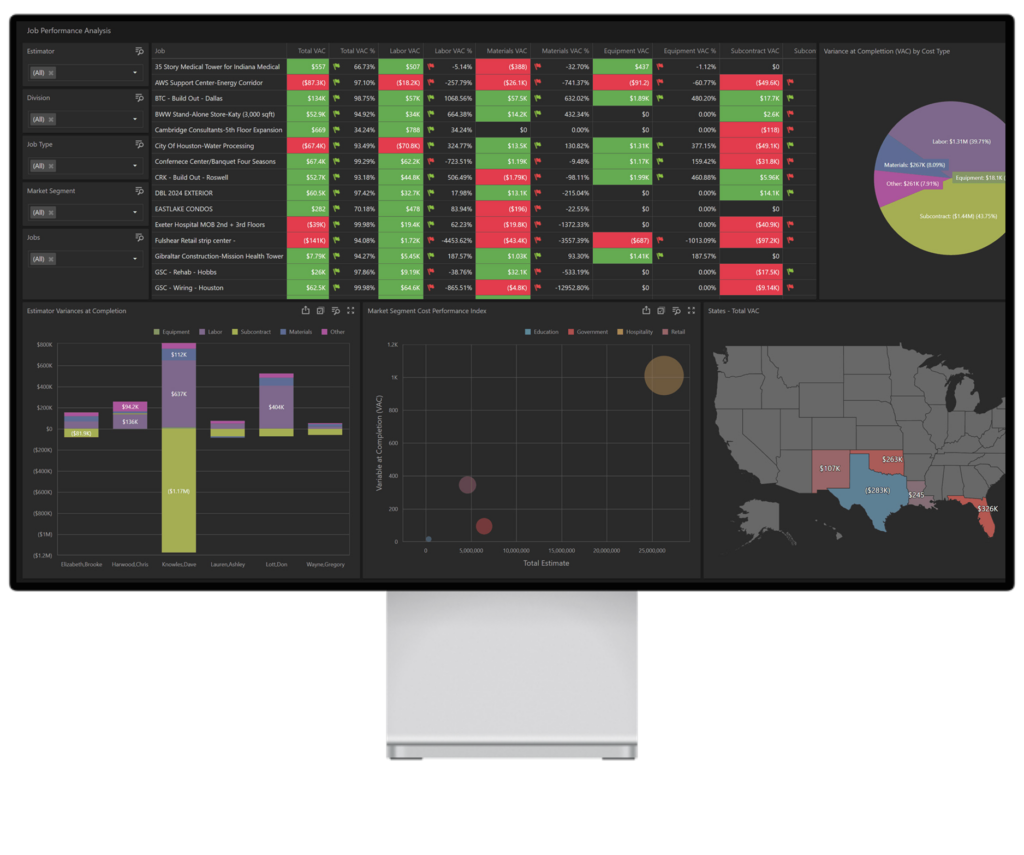
Rather than building reports from scratch or waiting on ERP exports, your team opens a dashboard and sees the current state of every active job: costs incurred to date, budget consumption, over/under billing status, and projected margin at completion. Drill down by cost code, estimator, or division to pinpoint exactly where a variance is developing.
The ContractorBI dashboard library includes over 45 pre-built views covering job cost performance, cash flow forecasting, WIP reporting, revenue projections, and more — all pulling from your live data without manual reconciliation.
| Without Job Cost Tracking Software | With ContractorBI™ |
|---|---|
| Scattered job cost data across spreadsheets and ERP | All job cost data in one real-time dashboard |
| Overruns discovered at job close — too late to act | Variance alerts surface issues while projects are still in progress |
| Manual reconciliation of labor, materials, and subs | Automated data pull from Sage, Procore, Viewpoint, and more |
| Budget-to-actual reports built once a month | Live budget vs. actuals updated continuously |
| Finance team spends days on WIP and close cycles | WIP prep time cut from days to hours |
Connecting Job Costs to Budgeting and Cash Flow
Job cost tracking is only half the picture. The real value comes when cost data connects forward to revenue forecasts, cash flow projections, and bonding calculations. That’s the link that most ERP-plus-spreadsheet setups miss entirely.
When cost tracking is integrated with your billing schedule and contract values, you can answer questions like: Which jobs are cash-positive this month, and which are creating a working capital drain? That visibility lets your team make proactive decisions about payment timing, credit line activity, and project prioritization rather than discovering cash crunches after they’ve already hit.
ContractorBI connects job-level cost performance directly to cash flow projections and WIP reporting. When a job’s percent-complete shifts or a change order gets processed, those updates flow through to your financial forecasts automatically.
For CFOs preparing bonding submissions or board reports, this matters enormously. Manual bonding calculations built from lagging ERP data carry real risk. When your WIP and cost data updates in real time, your financial representations stay accurate and your reporting reflects the actual state of the business. Learn more about how ContractorBI supports construction CFO needs.
 Making the Transition: From Manual Tracking to Real-Time Insight
Moving off spreadsheets doesn’t have to be disruptive. The most effective approach is to start with a clear data baseline and connect your existing systems first rather than trying to rebuild your entire reporting process at once.
A typical transition with ContractorBI follows three practical steps:
- Connect your ERP and accounting system. ContractorBI integrates with Sage, Viewpoint, Procore, and other platforms via secure APIs, pulling job cost, labor, and contract data automatically. Your accounting team keeps working in familiar tools; ContractorBI adds the analytics layer on top.
- Deploy pre-built dashboards. With over 45 pre-built dashboards tailored to construction finance, your team isn’t starting from a blank screen. Budget vs. actuals, cash flow projections, and WIP schedules are ready right away.
- Build a culture of daily visibility. The shift from monthly reporting to continuous monitoring is cultural as much as technical. When project managers and controllers review the same live dashboards in weekly meetings, cost problems surface faster and get resolved before they compound.
TopBuilder’s Construction Data Services can help clean and reconcile your historical data before onboarding, so your dashboards start with accurate baselines. Most mid-sized contractors complete initial setup within a few weeks.
Cost overruns don’t wait for month-end close — and your job cost tracking shouldn’t either. With ContractorBI, construction finance teams gain real-time visibility into every active job, catch variances before they erode margins, and connect cost performance directly to cash flow and WIP.
Start your 14-day free trial and see your job cost data come to life.
Related Content

Project Bidding Made Easy for Electrical Contractors

Stop Wasting Time Chasing Dead Ends: Simplify Construction Bidding