
The Controller’s Guide to Leveraging Data Analytics in Construction Forecasting Software
Construction forecasting software replaces static spreadsheets with real-time dashboards that improve forecast accuracy and cut WIP prep time from days to hours. By centralizing bid data, job performance, and pipeline metrics, controllers can plan cash flow, predict margins, and make faster, more confident decisions. Here’s how to get started.



Table of Contents
Why Data Analytics Matters in Construction Forecasting Software
Rising material volatility and labor constraints have made ‘gut feel’ forecasts too risky for any contractor serious about protecting margins. Plus, labor shortages continue to challenge even well-established firms. In fact, 92% of U.S. construction firms struggle to find qualified candidates according to a 2025 workforce survey by the Associated General Contractors of America and National Center for Construction Education and Research.
Controllers and CFOs can no longer rely on static assumptions built into last year’s spreadsheets. Construction forecasting software with embedded data analytics replaces those static spreadsheets with continuously updated insights. Instead of manually pulling job cost data once a month, these platforms ingest real-time data from accounting, estimating, and field systems to recalculate forecasts automatically.
The typical pain points for controllers are well-documented:
- Manual job-cost rollups that consume days each month
- Inconsistent productivity assumptions across project managers
- Reactive margin corrections discovered too late to address
- Data silos between field teams and the accounting office
Data analytics surfaces patterns in job performance, win rates, and backlog trends that humans miss when working from siloed reports. Disconnected data also leads to cost overruns; McKinsey reported that large construction projects may run up to 80% over budget and take 20% longer to complete. Firms using forecasting software can take control of these costs.
Core Components of Construction Forecasting Software for Controllers
Construction forecasting software today is built on specific data building blocks that work together to produce more accurate forecasts. Understanding these components allows controllers to better evaluate tools and set-up effective forecasting workflows.
| Data Source | What It Provides | Forecasting Application |
| Bid history | Original estimates, unit costs, labor hours | Baseline for cost and revenue projections |
| Awarded contracts | Contract values, billing terms, schedules | Revenue timing and backlog calculations |
| Change orders | Scope adjustments, approved dollar amounts | Updated contract value forecasts |
| Labor productivity | Hours per unit by trade, crew, task | Labor demand and cost projections |
| Equipment usage | Machine hours, rental costs, utilization | Equipment budget forecasting |
| Pipeline opportunities | Future bids, probability weights, timing | Weighted revenue and capacity planning |
These data components feed job forecast calculations, cash flow projections, and labor plans month by month. For example, for cash flow forecasting you shouldn’t solely rely on when receivables are due; you need to consider customer payment history.
Automated data ingestion from estimating, accounting (such as Sage 100 Contractor/300 CRE/Intacct Construction or Viewpoint Spectrum), and project management platforms eliminates manual entry errors. The software pulls actual costs and production quantities directly from source systems, keeping forecasts aligned with what’s happening in the field.
A typical data-flow architecture moves information from field apps and office systems into a central analytics engine, where it’s processed into dashboards and reports that controllers can review instantaneously.
How ContractorBI Uses Data Analytics To Power Construction Forecasting
TopBuilder’s ContractorBI™ is a construction forecasting software and business intelligence tool purpose-built for contractors. It provides the analytics layer that connects financial, operational, and sales data into a unified view for controllers and CFOs.
ContractorBI integrates three main data streams:
- Historical bid data – Past estimates, awarded projects, and win/loss records
- Job performance history – Labor hours, costs, and production metrics from completed and active jobs
- Future project pipeline – Opportunities, probabilities, and projected start dates
The software calculates job forecast calculations using Earned Value Management principles. It compares Planned Value (how much you spent) against Earned Value (how much actual work you’ve completed) and Actual Costs (actual dollars or hours spent) to identify variances early.
Rather than applying flat assumptions, ContractorBI uses construction job cost accounting principles to project cost-to-complete and final margin. Dashboards available through the ContractorBI dashboard library include project-level financial tracking, labor forecasting, revenue projections, and more.
Integrating Bid Data for More Accurate Revenue and Cash Forecasts
ContractorBI imports historical bid logs and awarded projects from TopBuilder CRM or other bid-management tools. This creates a complete record of what was estimated, what was won, and what actually happened on each job.
Win rates are calculated by customer type, project type, and geography. Let’s say a contractor might win 60% of government work but only 35% of private bids. These rates weight future pipeline revenue forecasts so projections reflect realistic outcomes rather than wishful thinking.
For controllers, this means turning a raw bid list for 2025 and 2026 into a probabilistic revenue forecast by month or quarter. A $10M opportunity with a 40% win probability contributes $4M to the weighted forecast, not the full amount.

Using Historical Job Performance and Bidding Data To Refine Labor and Cost Forecasts
Past job performance is the strongest predictor of future labor needs on similar work. If your crews consistently install 200 linear feet of ductwork per day on commercial projects, that’s the rate that should drive your labor forecasts.
For these forecasts, ContractorBI considers:
- Active jobs in your accounting system
- A weighted forecast of bidding activities
- Historical job performance to calculate projected probability
Connecting Project Pipeline Metrics to Cash Flow and Capacity Planning
Pipeline analytics in construction forecasting software links future work to revenue timing, cash needs, and staffing requirements. Without this connection, controllers often discover capacity constraints or cash crunches too late to respond effectively.
ContractorBI lets users map estimated start dates, durations, and contract values for each opportunity in the pipeline. These pipeline metrics roll into time phased budgeting for monthly revenue, billings, and cash receipts based on user-defined billing curves.
The result is a forecast showing how confirmed backlog plus weighted pipeline creates a 12-18 month revenue outlook. Controllers can quickly see when projected workload exceeds field capacity (and vice versa) and adjust hiring or subcontracting plans accordingly.
Practical Workflow: Building a Data-Driven Construction Forecast With ContractorBI
Here’s a step-by-step guide for controllers and CFOs implementing construction forecasting software for the first time. The workflow moves from connecting data sources through running forecasts and collaborating with operations leaders.
The typical implementation path includes:
- Cleaning and validating historical data
- Connecting data sources and import clean data
- Configuring standard metrics and assumptions
- Running an initial forecast
- Iterating with project teams and operations leaders
Most mid-sized contractors can complete initial setup within a few weeks if data sources are accessible and someone owns the cleanup process.
Step 1: Clean and Validate Historical Job Data
Analytics are only as reliable as the job-cost and production data feeding them. Before relying heavily on forecasts, controllers need to complete these data cleanup activities:
- Close out old jobs that are still open in the system
- Correct negative cost entries from accounting errors
- Standardize unit measures across projects (square feet, linear feet)
- Verify that labor hours tie to payroll records
- Ensure change orders are properly recorded against contracts
Software like ContractorBI can flag inconsistent or missing data, such as cost codes without quantities or jobs without recorded labor hours. A 60-90 day historical review typically catches most issues.
Once the initial cleanup is complete, ongoing data-quality issues are easier to spot through exception reports in the dashboards.
Step 2: Connect Accounting, Estimating, and CRM Systems
Accurate construction forecasting depends on synchronized data from accounting, estimating, and CRM platforms. Manual re-entry defeats the purpose of analytics-driven forecasting.
ContractorBI connects to common systems including Sage (100 Contractor/300 CRE/Intacct Construction), Acumatica, Viewpoint Spectrum, Vista, Procore, and TopBuilder CRM via secure integrations. Controllers should validate that job cost codes, cost types, and customer names are aligned across systems before running forecasts.
Once connections are configured, data refreshes run automatically on a real-time and daily schedule, depending on the data source. This provides real-time insights without manual intervention, so forecasts always reflect the latest field activity and financial transactions.
Step 3: Configure Forecasting Rules and Assumptions
Controllers should define global forecasting rules that the software applies consistently across jobs and time periods. These rules create standardization while still allowing flexibility.
ContractorBI lets users override global assumptions on individual projects where unique risks or contract terms apply. A complex renovation might need different productivity assumptions than new construction.
Document these assumptions so that any controller or CFO reviewing the forecasts understands how they’re produced.
Step 4: Review Forecast Dashboards With Operations Leaders
The best construction forecasting software supports collaboration, not just finance-side reporting. Project managers and superintendents bring field knowledge that validates or challenges forecast assumptions.
Controllers can use ContractorBI dashboards during monthly operations and planning meetings to review job forecasts and job cost performance live. The team can drill into over-budget line items, crew-level productivity, and expected cost-to-complete directly from the dashboard view.
Key dashboard types for these reviews include:
- Current and completed job-level job cost performance
- Cash flow projections and cash requirements
- Project progress and cost to complete tracking by phase
- Revenue forecast using active jobs and job in the bidding cycle
- Revenue opportunities (gaps in bidding activity)
In a typical monthly review, a forecast might warn of a 3% margin fade on a mechanical project. The team investigates, identifies job cost performance issues, and adjusts cost overruns before any variance grows larger.
Key Analytics Dashboards in ContractorBI for Controllers and CFOs
ContractorBI provides several dashboards that convert raw construction data into at-a-glance views supporting fast and informed decisions. Each dashboard serves a specific purpose for financial leaders overseeing multiple projects simultaneously.
Financial Health & Performance Dashboard
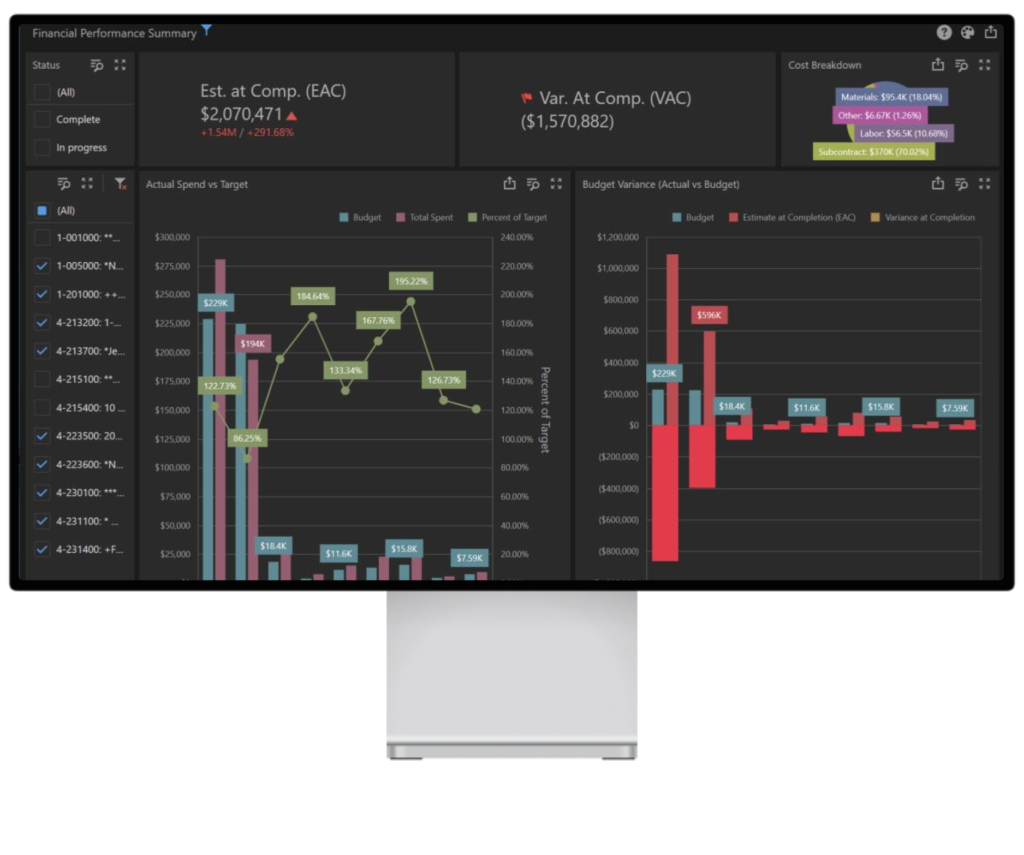 The Financial Health & Performance Dashboard delivers live, consolidated visibility into revenue projections, cash flow trends, job profitability, and cost control, allowing finance teams the insights needed to act early and plan confidently.
It solves common challenges such as:
- Unanticipated cost overruns and shrinking margins
- Limited visibility into project liabilities and financial exposure
- Difficulty forecasting revenue and managing cash flowGaps in budgeting and
- long-term financial planning
- Slow, manual reporting cycles that delay decision-making
- Critical financial ratios and KPIs
It helps answer critical questions like:
- Are we financially on track to hit our targets?
- Where are we most exposed to budget risks or shortfalls including working capital requirements?
- Which business areas are underperforming?
Cash Flow Projection and Job Cash Balance Projection
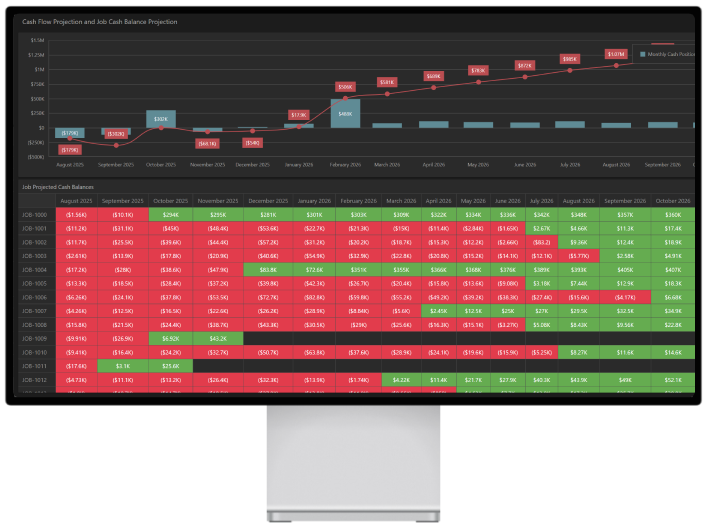
This dashboard gives controllers a clear, real-time view of cash flow by pairing projected month-end balances with month-by-month cash movement. It makes it easier to spot key turning points — when the business moves from tight to comfortable — and flags low-revenue months sooner.
The job-level heatmap then connects the dots between project performance and the overall cash picture. By showing projected cash contribution by job and month, and calling out negatives versus positives, it quickly highlights which jobs are creating cash strain now, which are expected to recover, and which may be structurally cash-negative.
Together, this chart turns forecasting into action to solve problems like:
- Planning payroll, vendor payments, and credit line activity before timing becomes a problem.
- Attending to billing cadence, collections, change orders, or cost timing.
Controllers can focus invoicing and AR follow-up where it matters most, confirm that billing schedules align with the forecast, and make strategic decisions about payment timing and working capital. The result: leadership gets not just a reliable cash outlook, but a more-informed plan to improve it.
Business Benefits of Analytics-Driven Construction Forecasting Software
Data analytics in construction forecasting software delivers measurable financial and operational gains. These benefits extend beyond the finance department, supporting project managers, estimators, and executives through shared, transparent forecast data.
Benefits include:
- Improved forecast accuracy
- Stronger margin protection through early variance detection
- Better cash control and working capital management
- More confident growth planning with data-backed scenarios
More Predictable Margins and Fewer Late Write-Downs
Analytics-driven job forecast calculations reduce the gap between forecast gross margin and actual results at job close. Early detection of cost overruns at the line-item or crew level lets teams adjust staffing, productivity, or change-order strategy before margins erode.
When analytics detect a 3% margin fade mid-project, targeted interventions — reassigning crews, accelerating change order processing, or adjusting resource allocation — can preserve a significant portion of that margin by completion.
More predictable margins support stronger banking relationships by demonstrating financial control. They also enable more accurate incentive compensation plans tied to project performance rather than surprises at closeout.
Faster WIP, Month-End Close, and Board Reporting
ContractorBI centralizes the data normally collected via multiple emails and spreadsheets. WIP schedules, forecast reports, and executive summaries generated from live dashboards instead of manual compilation.
The time savings are substantial. Controllers report reducing WIP preparation from multiple days each month to only a few hours of review and commentary. Export options include Excel, PDF, and as a graphic so reports can be added to presentations or shared with colleagues.
This efficiency frees up finance leaders to focus on analysis and strategy rather than data wrangling. When potential issues appear in the data, there’s time to investigate rather than just document.
Better Strategic Planning for Growth and Capacity
Multi-year revenue, labor, and cash forecasts support longer-term strategic decisions. Controllers and CFOs can model scenarios for opening new branches, purchasing equipment, or adding new self-perform trades.
For example, a contractor might use ContractorBI’s forecasts to justify hiring an additional estimator based on projected bid volume, or to evaluate opening an office in a high-growth region where pipeline opportunities are concentrated.
Strategic planning is strengthened by showing data-backed scenarios to stakeholders instead of relying on optimistic projections alone. This allows controllers and CFOs more control over the company’s future trajectory with confidence in the underlying numbers.
Getting Started With ContractorBI Construction Forecasting Software
Ready to explore ContractorBI in greater depth? The typical onboarding journey includes a discovery call, data review, and rollout to finance and operations teams.
What To Prepare Before a ContractorBI Demo
Coming to the demo with real information makes the session more valuable. Gather these items before scheduling:
- Sample WIP reports from recent months
- Current backlog report by project
- Bid log showing active opportunities
- List of primary accounting and estimating systems
- Identify two to three recurring forecasting pain points to focus the demo.
Common examples include labor overruns, inconsistent revenue projections, or cash crunches at specific points in the project cycle.
Schedule a ContractorBI demo to see how analytics-driven forecasting can transform your workflow.
We also offer a free 14-day trial (no credit card required) with example dashboards that use anonymized sample data to reflect actual reports.
Related Content

Project Bidding Made Easy for Electrical Contractors

Stop Wasting Time Chasing Dead Ends: Simplify Construction Bidding