
How Specialty Contractor Software Supports Service-Oriented Trades
Service-oriented specialty contractors lose margin when their CRM, work orders, and accounting system don’t talk to each other — and most don’t. See how specialty contractor software connects field and office data in real time to protect margins, track labor accurately, and keep cash flow visible across every work order.



Table of Contents
A service-oriented specialty contractor runs a different business than a project-based one. Instead of three or four large jobs in motion, you’ve got 50 work orders moving at once. Crews are dispatched, not deployed, and their travel time eats into the day. A job that should take four hours might take six, and you won’t know it lost money until payroll posts two weeks later.
The gap between what the office estimated and what the field actually delivered is where margin disappears. And for most service-oriented trades, the gap exists because the tech stack doesn’t talk to each other, including the CRM, work order workflow, and the accounting system. The right specialty contractor software closes that gap, connecting field and office staff to the same real-time data across the entire project lifecycle.
Why Service-Oriented Contractors Need Connected Systems
Service work is high-volume and low-tolerance. Every work order is a mini-project with its own estimate, crew, travel time, and margin. Multiply that across a week and that’s a lot of variables to track across many projects at once.
Most service-oriented contractors are running three disconnected tools: a CRM for customer history and service requests, a separate work order or dispatch system, and Sage or other ERP for accounting. If data moves between them via spreadsheet and manual re-entry, you’re losing efficiency and money. Using software to automate these repetitive tasks can boost productivity, freeing teams to focus on higher-value work instead of manual re-entry.
When those systems talk to each other, you get real-time visibility into the complete picture. Think:
- Estimated hours sit next to actual payroll hours.
- Travel time gets tracked against the work order, not buried in a timecard.
- The CFO can see margin by crew, customer, or service type.
Top Issues Facing Service-Oriented Specialty Contractors
Each of the following issues is a symptom of the same underlying problem: the systems that capture the work and the systems that capture the cost are disconnected. Specialty contractor software built for service-oriented trades solves them at the root.
Margins are eroding on almost every job.
A Dodge Construction Network study with Procore found that 99 percent of specialty contractors experience erosion of their profit margin during construction projects, with one third tied to unplanned rework and one third of revenue lost to unbillable changes.
Specialty contractors face unique pressures that general-purpose platforms aren’t designed for—including heavy field-to-office communication demands, precise cost-code tracking, and complex change orders that must be documented and billed without delay.
Too many trades are still running on paper and Excel.
Dodge and Procore also reported that 39 percent of specialty contractors still use spreadsheets, paper forms, and other outdated methods to manage key activities instead of purpose-built construction software.
For service-oriented work, where a single dispatcher might touch 20 work orders before lunch, that’s a structural drag on every margin in the business. The digital transformation from manual work to connected construction operations is no longer optional.
Payment cycles are squeezing working capital.
The same research found that only 27 percent of specialty contractors are paid within 30 days of invoicing for completed work, and 29 percent report their typical payment period exceeds 60 days. Service contractors can’t afford to wait that long to find out what a job actually costs — accurate financial management and job costing data need to be visible well before the invoice goes out. Digitizing field tickets and change order documentation makes it possible to invoice clients the moment a job wraps, rather than waiting days for paper to catch up.
Labor data lags reality.
Industry analysts have flagged the core problem clearly: when labor costs hit accounting systems days or weeks after work occurs, project managers lose the ability to make course corrections. In service work, jobs close in days and this compounding data lag hurts margin. Effective job costing requires tracking expenses against budgets continuously throughout the project lifecycle, not just at closeout.
Travel time is the invisible cost.
Service-oriented trades live and die by drive time. A crew billed at $150 an hour but spending 90 minutes getting to the job site has already chewed through a chunk of margin before the first tool comes out of the truck. If travel isn’t tracked against the work order — and compared to the original estimate — that loss stays invisible until the job is over.
Field Operations and Field Collaboration
Field operations for service-oriented specialty contractors are fast-moving and hard to supervise centrally. Jobs overlap and the data from each job site needs to get back to the office before anyone can make sense of it.
The right platform builds field collaboration into the workflow. Field teams log time, complete daily logs, attach photos, and update work order status from a mobile device using a construction mobile app. That information updates instantly in the back-office system. The integration of real-time data across field and office functions enables better decision-making and closes the communication gap that causes most service-work margin loss. A user-friendly interface means crews actually use the software in the field instead of falling back to paper forms.
How TopBuilder Supports Service-Oriented Specialty Contractors
This is where purpose-built specialty contractor software earns its place. TopBuilder CRM and ContractorBI™ are designed to handle service workflows alongside project workflows. Together, they act as a central hub for construction operations, connecting the sales team, field teams, project managers, and finance in one platform.
Benefits include fewer delays, mitigated risks, transparent billing, and stronger client relationships with outcomes that generic platforms can approximate, but rarely deliver, for service-oriented trades.
Service Activity and Financial Management in ContractorBI
ContractorBI is the financial management layer that matters most for CFOs. The work order dashboard pulls payroll hours from Sage and compares them against the estimated time for each work order, including travel. If a crew was scheduled for four hours and payroll says they billed six, the dashboard shows it.
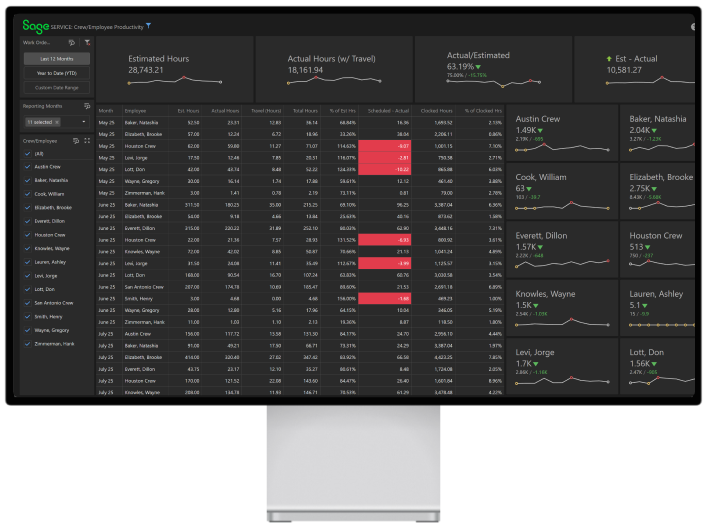
The CFO can see in seconds whether the estimate was too tight — meaning the firm is bidding service work at a loss — or whether crews are taking longer than expected on-site. Two different problems with two different fixes, but both invisible without the data side by side. ContractorBI surfaces actionable insights from existing accounting data, so there’s no parallel timekeeping system to maintain and no reconciliation at month-end.
Cost codes tie each work order to the right financial bucket automatically, so job costing reports reflect actual costs without manual clean-up. Ongoing cost control — monitoring expenses and adjusting course throughout the project lifecycle rather than waiting until closeout — is what keeps margins intact on high-volume service work.
The CRM and Your Accounting Platform Stay in Sync
TopBuilder integrates with Sage 100 Contractor, Sage 300 CRE, and Sage Intacct Construction so service requests, work orders, service locations, and customer records flow in both directions. This integration with existing systems means no duplicate entry and no data gaps between CRM and accounting. Unlike platforms built around large project workflows, TopBuilder was designed with service-oriented trade contractors in mind from the start.
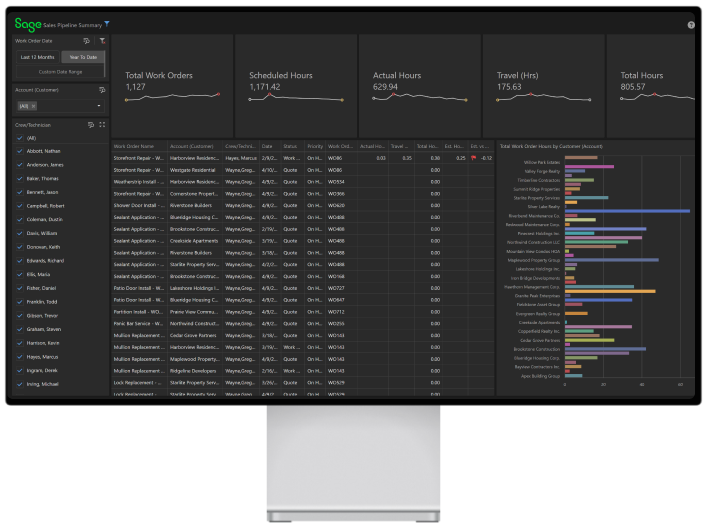
Integration options also matter for the sales team. When a proposal converts to an awarded work order, it flows to the accounting system automatically, where the job is created and tracked. Statuses and financial data flow back to TopBuilder and ContractorBI instantaneously. Everyone on the team makes decisions from the same synced project data. Centralized platforms like this keep all parties aligned on common goals, which reduces rework and improves project efficiency across the board.
Accurate Estimates and Bid Management
Contractors can submit bids and proposals against any service request and categorize them as work orders by job type. That means accurate estimates drive every work order, and when actual costs come in, the comparison is immediate. Purpose-built estimating tools support the creation of detailed, professional proposals with reusable cost templates and material markups, so estimators aren’t starting from scratch on every bid. The same workflow handles a one-day repair and a three-month retrofit without a dedicated system for each.
Over time, this data builds a library of job cost benchmarks. Estimators can see what similar work actually costs — including labor costs, travel, and materials — and produce accurate estimates that protect margin instead of eroding it.
Mobile Logging Closes the Field Data Gap
A crew on-site can log a work order from a phone or tablet using the TopBuilder mobile app. No more waiting for someone to retype a paper ticket into the system three days later! The mobile app eliminates the lag that wrecks job-cost accuracy and saves time across every work order in the system.
This is field collaboration in practice: data captured where the work happens and visible to office staff the moment it’s entered. The platform updates instantly, so project managers always have current status updates without chasing the field for reports.
Choose Specialty Contractor Software That Fits Your Business Needs
Not all construction management software is built for service-oriented work. General-purpose management software for construction companies is often designed around a handful of large construction projects, not multiple work orders dispatched across a metro area.
When evaluating specialized software, consider:
- Does it connect field operations and financial operations, or does data still flow through spreadsheets?
- Does it support the entire project lifecycle from estimate to invoice including travel and labor tracking?
- Does it integrate with existing systems like Sage, or does it replace them?
- Is the interface user friendly enough that field teams will actually use it at the job site?
- Does it provide actionable insights for the CFO and project managers, or just raw data?
The right solution for service-oriented specialty contractors is the one that connects construction operations across the entire project lifecycle without adding complexity. Finding the right solution means matching the software’s architecture to the way your business actually runs, which is what drives sustainable growth over time.
And it pays off. Investing in the right specialty contractor software leads to increased productivity, better customer service, and stronger data-driven decision-making at the leadership level. Smaller contractors have different business needs than larger contractors, but both benefit from connected workflows that eliminate manual work and improve customer satisfaction.
Construction Operations Built for Service Work
A mechanical service division running 200 work orders a month doesn’t need another project management tool. It needs field and office staff to share one set of numbers with the accounting data already wired in.
That’s the difference between specialty contractor software built for service-oriented trades and a generic platform retrofitted to handle them. When your CRM, work orders, and Sage data behave like one system, controllers can stop reconciling and start managing. Margin shows up where it belongs: on the dashboard, not in next quarter’s surprise.
See How ContractorBI Works With Your Data
If service work is a meaningful share of your revenue, ContractorBI was built for the way your business runs. Schedule a demo to see your work order performance alongside your Sage data in one place.
Related Content

Project Bidding Made Easy for Electrical Contractors

Stop Wasting Time Chasing Dead Ends: Simplify Construction Bidding