
7 Best Practices for Tracking Construction Work in Progress (WIP)
Accurate work-in-progress tracking gives construction teams the real-time visibility they need to protect margins, improve forecasting, and keep projects on track. Here are seven best practices to help you streamline your WIP process and strengthen financial performance across every job.



Table of Contents
7 Best Practices for Tracking Construction Work in Progress (WIP)
Are your jobs staying on schedule? Are invoices keeping pace with expenses and revenue? Is your margin holding steady, or slipping without warning?
These are the questions that keep construction finance leaders and project managers up at night, especially when they’re relying on disconnected legacy systems that can’t deliver real-time visibility. This is especially scary when you don’t know how to evaluate your project’s financial standing — or financial health — across ongoing projects.
Solid Work in Progress (WIP) tracking practices — and better tools — give construction teams the clarity they need to evaluate performance, catch issues early, and maintain healthy margins. Here are seven essential steps to improve visibility on your construction work in progress reports and strengthen overall project progress, performance, and financial transparency.
1. Centralize Job Cost Data From Multiple Systems
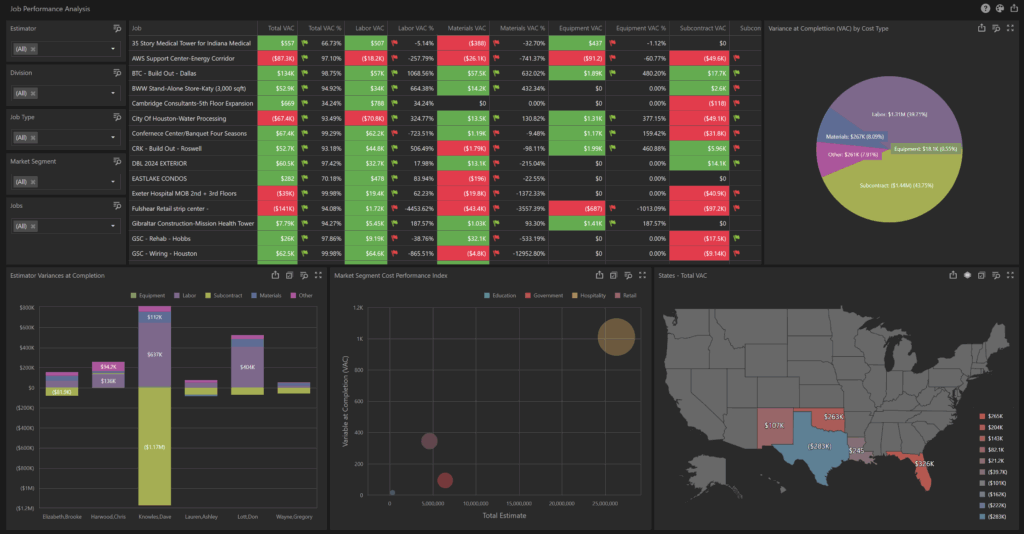
Fragmented data is one of the biggest obstacles to accurate WIP tracking and project financial management. When project details, estimates, and accounting live in separate systems, delays and errors are inevitable.
Centralizing job cost data through an integrated platform like ContractorBI™ ensures budgets, actuals, and forecasts update in real-time from a single, reliable source of truth, keeping everyone up to speed. This foundation supports more accurate construction accounting and cost management so teams can better track progress and maintain financial stability across all construction projects.
2. Continuously Compare Budget vs. Actuals
Managing profitability effectively is all about tracking how current costs align with original estimates. Regular comparisons highlight variances early so you can act fast before overruns spiral out of control.
This is a challenge if you’re manually updating and comparing data in siloed systems, but platforms like ContractorBI make it easy to track budget vs. actuals with tailored dashboards, where you can instantly visualize metrics and drill down into problem areas.
You’ll be able to compare:
- Cost codes and job costs
- Cost categories
- Job type or division
- Time period (monthly or quarterly)
These comparisons help surface costs incurred, actual costs, and committed costs, ensuring you stay aligned with your initial estimated profit margin and total estimated costs.
3. Use Real-Time Dashboards for Visibility Into Construction Projects
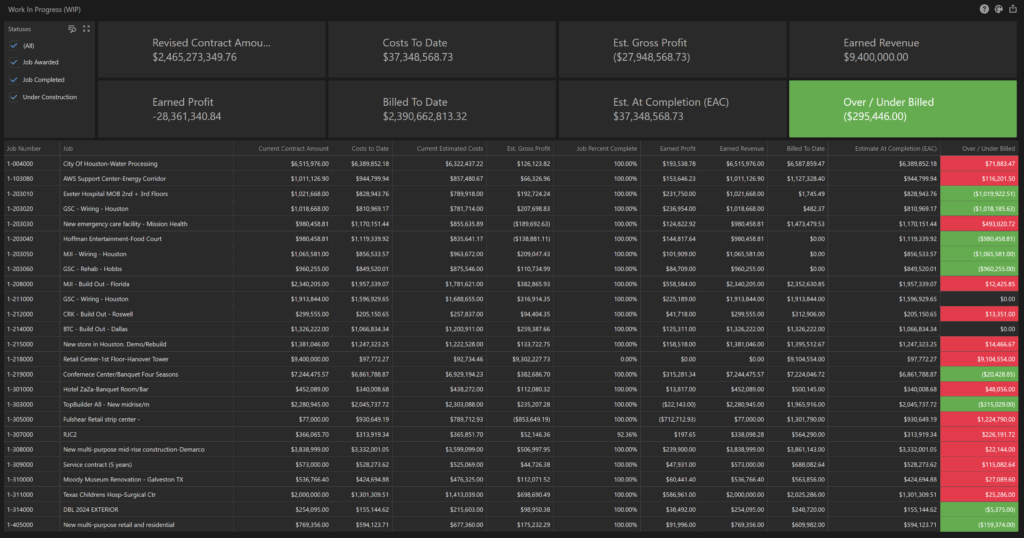
Spreadsheets are static and quickly become stale; even with cloud sharing, version control is a constant challenge. Real-time dashboards unify accurate data from across the company into a single source of truth, allowing stakeholders — from field supervisors to CFOs — access to the same live information and more effective collaboration.
These dashboards provide a more accurate picture of project finances, project costs, and project data, making it easier to manage resource allocation and identify cost overruns.
4. Forecast Labor and Revenue, Not Just Cost
Construction work-in-progress reporting is most valuable when it predicts outcomes, not just summarizes the past. Effective WIP tracking should reveal labor availability and utilization, projected costs versus revenue over time, and how historical bid win rates align with your current sales pipeline.
ContractorBI supports this approach with predictive analytics that forecast labor needs and revenue across active and upcoming projects, giving teams the insight to plan ahead with confidence. This visibility helps companies avoid negative cash flow, improve cash flow management, and maintain stronger profit margins.
5. Tailor Reports to Different Stakeholders
Executives need big-picture trends, while project managers rely on detailed variance reports. When every stakeholder receives the same “kitchen sink” report, meaningful insights get buried — a common issue with tools not built for the construction industry.
ContractorBI was designed specifically for the construction industry and solves the “kitchen sink” problem with role-specific dashboards that tailor WIP reporting to each audience for clarity and actionability that supports stronger risk management. With ContractorBI, you can filter data by job, region, client, or timeframe and present insights visually through graphs, charts, and benchmarks. This improves project management and enables smarter project prioritization.
6. Track Early Warning Indicators of Revenue Leaks
Waiting until a project ends to assess performance is a big risk, especially in the construction industry where margins are tight and scopes often shift. Being able to monitor key WIP signals is essential to managing the overall health and growth of your business.
Spotting big risk signals early, such as rising labor hours versus output, frequent change orders, and lagging payment collections, can help you prevent profit fade and improve job-level decision-making. These insights enhance project lifecycle visibility, and allow teams to intervene before construction WIP issues impact revenue recognition on the balance sheet.
7. Automate Reporting With Construction Accounting Templates
Manual WIP reports are time-consuming and error prone. At the same time, software tools that aren’t purpose-built for construction are also labor-intensive to set up and often fail to deliver meaningful insights in the right place, at the right time, to the right person.
ContractorBI can save your team hundreds of hours with customizable templates for WIP summaries, cost-to-complete analysis, executive scorecards, and division-level rollups. This supports accurate WIP reporting through automatically generated reports that provide a accurate picture of your projects’ financial status and, most important, project success.

Bonus Tip: Align WIP With Financial Forecasting
Tracking construction work in progress isn’t about knowing what already happened. Effective WIP reporting is a key contributor to revenue forecasting and financial planning, to protect and cultivate your business’ overall health.
Integrating WIP data with your CRM and sales pipeline will give you a much more accurate picture of core business metrics, such as cash flow, future labor needs, project budget, and project finances — exactly what TopBuilder’s Construction CRM and ContractorBI are designed to do.
Construction WIP Reports Made Simple
With ContractorBI, you’ll be able to easily turn WIP stats into next steps:
- Flag jobs with falling margins or high cost variances
- Forecast cash flow based on under/over billing
- Track labor performance and productivity in parallel with WIP
- Visualize performance across projects, divisions, or estimators
These insights empower project managers, strengthen maintaining financial control, and help construction organizations achieve long-term financial stability.
Ready to streamline your WIP reporting and gain real-time visibility into performance across every job? Start your 14-day free trial of ContractorBI.
Related Content

Project Bidding Made Easy for Electrical Contractors

Stop Wasting Time Chasing Dead Ends: Simplify Construction Bidding