
How To Choose the Best CRM for Contractors in Commercial Construction
The best CRM for a construction company centralizes bid tracking, GC relationships, and pipeline data in one place, purpose-built for commercial contractors and not adapted from generic software.


Table of Contents
How To Choose the Best CRM for Contractors in Commercial Construction
Your estimator submitted 40 bids last quarter. You won 14. But do you know which GC relationships drove those wins? Which project types had the best close rate? Which customers paid on time and came back for more? If the answer lives in someone’s inbox or a spreadsheet with 11 tabs, you already know the problem — and you already know you need the right CRM software to fix it.
The best construction CRM software is built for managing customer relationships in commercial construction, not adapted from a generic platform. Most CRM systems can store contacts and log calls, but they weren’t designed around bid cycles, subcontractor relationships, or the way a job moves from preconstruction to close.
The best CRM for a construction company fits the way your business operates, not the other way around.
What Is Construction CRM Software and Why Do Construction Companies Need It?
Customer relationship management software has been around for decades, but most of it was built for industries that sell software subscriptions or consumer products. Construction CRM software is different. It’s purpose-built for the way construction companies operate — long sales cycles, relationship-driven bidding, dispersed job site teams, and projects that span months or years.
Construction CRM software helps construction companies track leads, manage sales pipelines, and keep client communication organized from the first inquiry through project closeout and repeat business. When you use a CRM built specifically for your workflow, you stop losing bids in spreadsheets and start building the kind of institutional knowledge that survives staff turnover.
A construction CRM stores all essential client data in one central platform, making it easy for everyone across estimating, project management, and the field to access and retrieve what they need. That single source of truth is what separates high-performing construction firms from those still relying on personal inboxes and shared drives.
A Construction CRM Has To Do 3 Things Well
It helps to think about CRM capability in three categories — not as software types, but as jobs your business needs done in the construction industry.
| Capability | What it means for your business | What breaks without it |
|---|---|---|
| Operational | Manage your sales process end to end — generate quotes, track bids, handle lead management, and keep follow-ups from falling through the cracks | Bids go cold, follow-ups get missed, and your pipeline lives in someone’s inbox |
| Analytical | Sales pipeline tracking across all active opportunities — see which customers close fastest, which project types win most often, and where your pipelines are thin | You chase the wrong work and reprice the same mistakes every quarter |
| Collaborative | Connect project managers, office, field, and finance teams — and sync with tools like Procore — so handoffs don’t become blind spots | Relationships walk out the door when people leave; institutional knowledge disappears with them |
According to FMI, nearly 96% of project data goes unused in the construction industry — and most of it sits in systems that can’t talk to each other. A construction-specific CRM is built to handle all three capabilities because, in commercial contracting, they’re all part of the same job.
Hidden Cost of Poor Client Relationship Management
Here’s a scenario that routinely plays out at construction firms: a senior estimator or business development rep leaves, and half your client relationships walk out with them. No contact history, no notes on past construction projects, no record of who owes who a call.
A CRM makes that institutional knowledge portable. Every customer interaction — emails, proposals, site visits, follow-ups — is logged against the contact and the project, not the individual. When someone new steps in, they’re not starting from scratch; they’re picking up a conversation that’s already documented.
For specialty contractors, MEP firms, and EPCs managing multiple projects with the same GCs over years, that relationship history is a competitive advantage. The construction CRM software will treat those client relationships as a business asset, not a personal one.
The CRM Solution for Stalled Business Growth
Most commercial contractors can tell you their backlog. Fewer can tell you which jobs in that backlog are likely to hit margin, which customers historically pay late, or which project types have been quietly underperforming for two years.
That’s not a data problem. It’s a visibility problem — and it’s expensive. Poor financial management decisions, manual data entry errors, and missing early signs of margin erosion all trace back to working without the right data. Did you know that sales reps can spend 70% of their time on non-revenue-generating activities — admin work, manual data entry — leaving just 30% for actual selling, according to a 2024 State of Sales report. For a commercial contractor’s estimating and BD team, that ratio is a direct hit to your win rate.
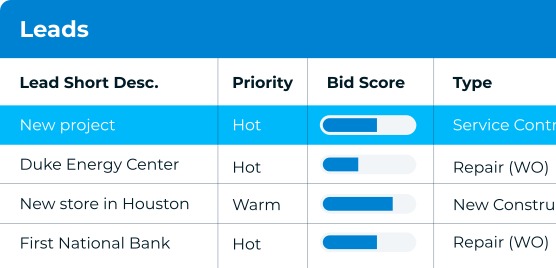
Once the data is centralized and connected between systems, this becomes a thing of the past. TopBuilder’s CRM solves this issue by connecting bid history, win/loss data, and customer performance in one place. You can see which GCs close fastest, which project types you win most consistently, and where your pipeline is concentrated before it becomes a problem.
For construction businesses that want to take this further, TopBuilder’s business intelligence tool ContractorBI™ connects directly to your CRM data and ERP to show not just what bids you’re winning, but what those jobs are actually delivering: margin by job type, cash flow by project, and revenue forecast by month. The CRM tells you where you’re headed, and ContractorBI tells you what it’s worth.
CRM Features That Matter Most for Construction Professionals
Before you sit through a CRM software demo, get clear on a few things that are non-negotiable:
- Bid management built in — not a workaround or a custom field, but a core feature that tracks bids, activity, and win/loss outcomes natively
- Integrated project management capabilities — direct connections to project management tools like Procore, Sage, Viewpoint, STACK, and BuildingConnected so you’re eliminating silos, not creating new ones
- A mobile app your field team will actually use — if pulling up a contact record requires a desk and a training session, adoption will stall
- Support that outlasts implementation — find out who answers the phone six months after go-live, not just during onboarding
- Construction-specific reporting — dashboards that surface bid win rates, customer profitability, and pipeline health without custom configuration
- Room to grow — make sure the platform can scale with your business as you add estimators, open new offices, or expand into new project types without forcing a costly migration later
TopBuilder CRM Was Built for Construction Businesses
TopBuilder’s CRM was designed specifically for commercial contractors — GCs, EPCs, specialty contractors, and MEP firms — which means bid management, contact management, pipeline reporting, and field accessibility aren’t afterthoughts. They’re the product. It’s customer relationship management that scales with your business, not against it.
The integration depth matters, too. TopBuilder connects with the tools your team already relies on:
- Procore and Acumatica for project management
- Sage 100 Contractor, Sage 300 CRE, Sage Intacct Construction for accounting
- STACK for takeoff and estimating
- BuildingConnected for bid invitations
Your project data flows between systems instead of living in separate silos. As your business grows, those connections mean your CRM grows with you rather than becoming the bottleneck.
That scalability also shows up in how TopBuilder is structured. Whether you’re a 20-person specialty contractor managing a regional pipeline or a multi-division GC tracking work across several markets, the platform is built to expand by easily adding users and dashboards without requiring a new implementation every time your business changes shape.
Client Case Study
Drew Robbins, VP of Operations at Jayhawk Fire Sprinklers, went from no visibility into sales performance to a clear view of their bids. “With TopBuilder, we can be more selective and choose to bid jobs where we have a higher win ratio and the customer pays on time,” he said. That kind of clarity doesn’t happen by accident — but it does happen when your CRM actually understands the business you’re in.
Request a demo to see TopBuilder’s construction CRM in action — and if you’re ready to connect your CRM data to real-time financial performance, ask us about ContractorBI™ while you’re there.
Construction CRM FAQ
What’s the difference between a construction CRM and a generic CRM?
A generic CRM manages contacts and deals. A construction CRM manages this plus bid cycles, GC relationships, project history, and win/loss data, with integrations built for the tools construction companies already use. The difference shows up immediately in easier team adoption and reports that are specific and pre-built.
How long does it take to implement a CRM for a construction company?
Most commercial contractors are up and running within a few weeks. Timeline depends on how many systems you’re connecting and how clean your existing data is. TopBuilder’s implementation team handles the setup so your team isn’t figuring it out alone.
Can a construction CRM connect to my accounting or estimating software?
Yes, and it should. TopBuilder integrates with leading construction platforms including Procore, Sage, STACK, and Viewpoint Spectrum, so bid data, project history, and financial performance stay connected rather than siloed across separate tools.
What CRM features do construction companies need most?
The essential CRM features for construction companies include: bid management, lead management, sales pipeline tracking, contact management, mobile app access, document management, workflow automation, integration capabilities with project management tools, and construction-specific reporting.
Related Content

Top 20 CRM Integrations to Help Automate and Grow Your Subcontractor Business

How To Boost Your Construction CRM Return on Investment for Maximum Results
